Key Takeaways
Almost every HCM vendor now calls its platform "AI-native," so the word on its own won't tell you much.
The real difference between AI-powered and AI-native HCM is in how the system is built and governed: whether it sees across the organization, reasons in your context, acts within limits you set, and reaches people where they work.
Seven questions, tested against scenarios from your own organization, will show you which platforms were built around AI and which had AI added later.
If you've sat through a few vendor pitches lately, you've probably noticed the same thing: everyone calls their platform “AI-native,” and after a while, the demos start to look pretty similar. But underneath, the technology and architecture can be very different.
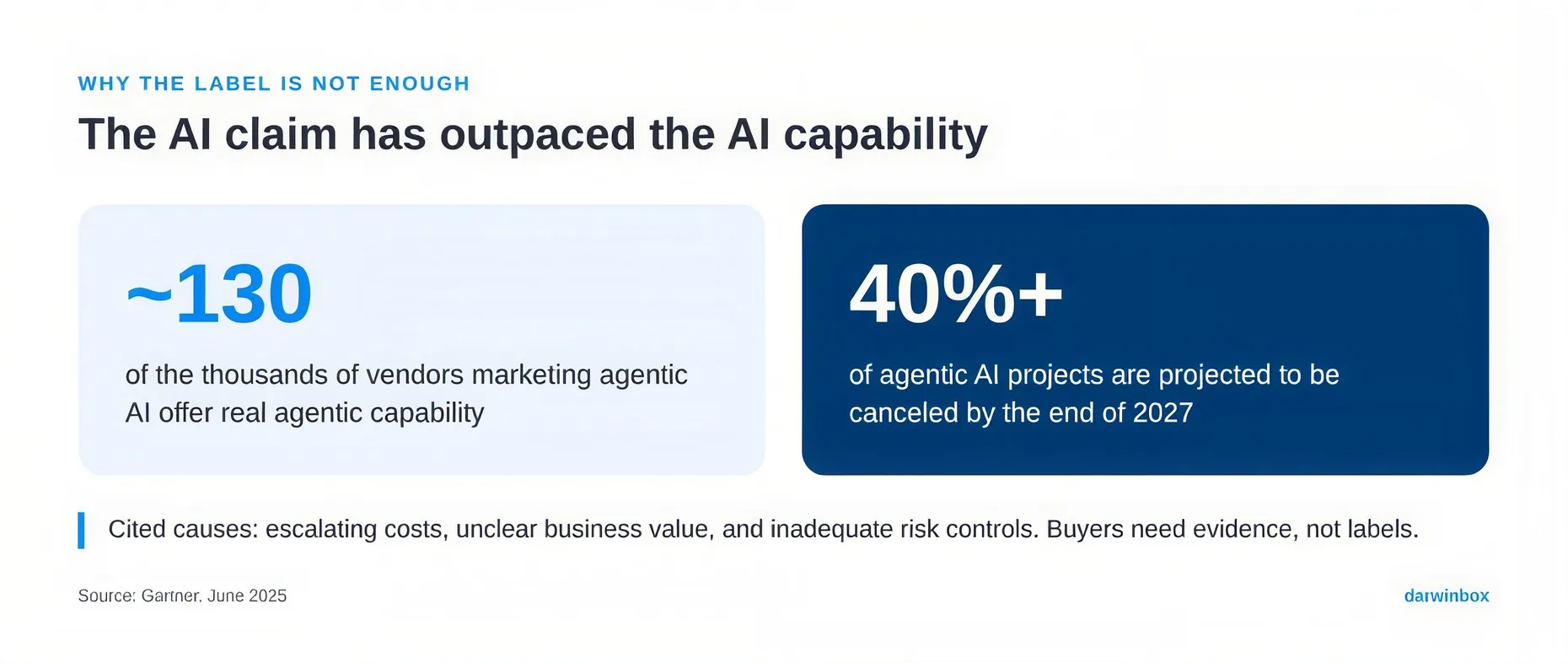
HR isn't alone here. In June 2025, Gartner estimated that of the thousands of vendors marketing agentic AI, only about 130 offer real agentic capability. Gartner gave the practice a name, "agent washing," which covers rebranding assistants, chatbots, and robotic process automation as agents. The same analysis predicted that more than 40% of agentic AI projects will be canceled by the end of 2027, citing escalating costs, unclear business value, and inadequate risk controls.
For HR leaders, the real question is whether the system can actually change how your function works and what outcomes you can achieve, or whether it simply makes a few tasks run faster.
This article explains the difference between AI-powered and AI-native HCM, and gives you seven questions to ask any HR tech provider to find out which one you're looking at.
What separates AI-powered HCM from AI-native HCM?
AI-powered HCM starts with a platform designed around separate modules and fixed workflows, then adds AI to it. That AI sits inside one module. It waits for something to happen, such as a form submission, a workflow step, or a typed question, and then responds. Some of these HR agents are genuinely capable and can finish multi-step tasks on their own. Even so, they stay inside the processes they were already built to run.
AI-native HCM is built on a different premise. It pulls signal from across the organization all the time, reads that signal against the company's own history and policies, and acts within boundaries the organization defines. As the system builds up a record of good decisions, those boundaries can widen.
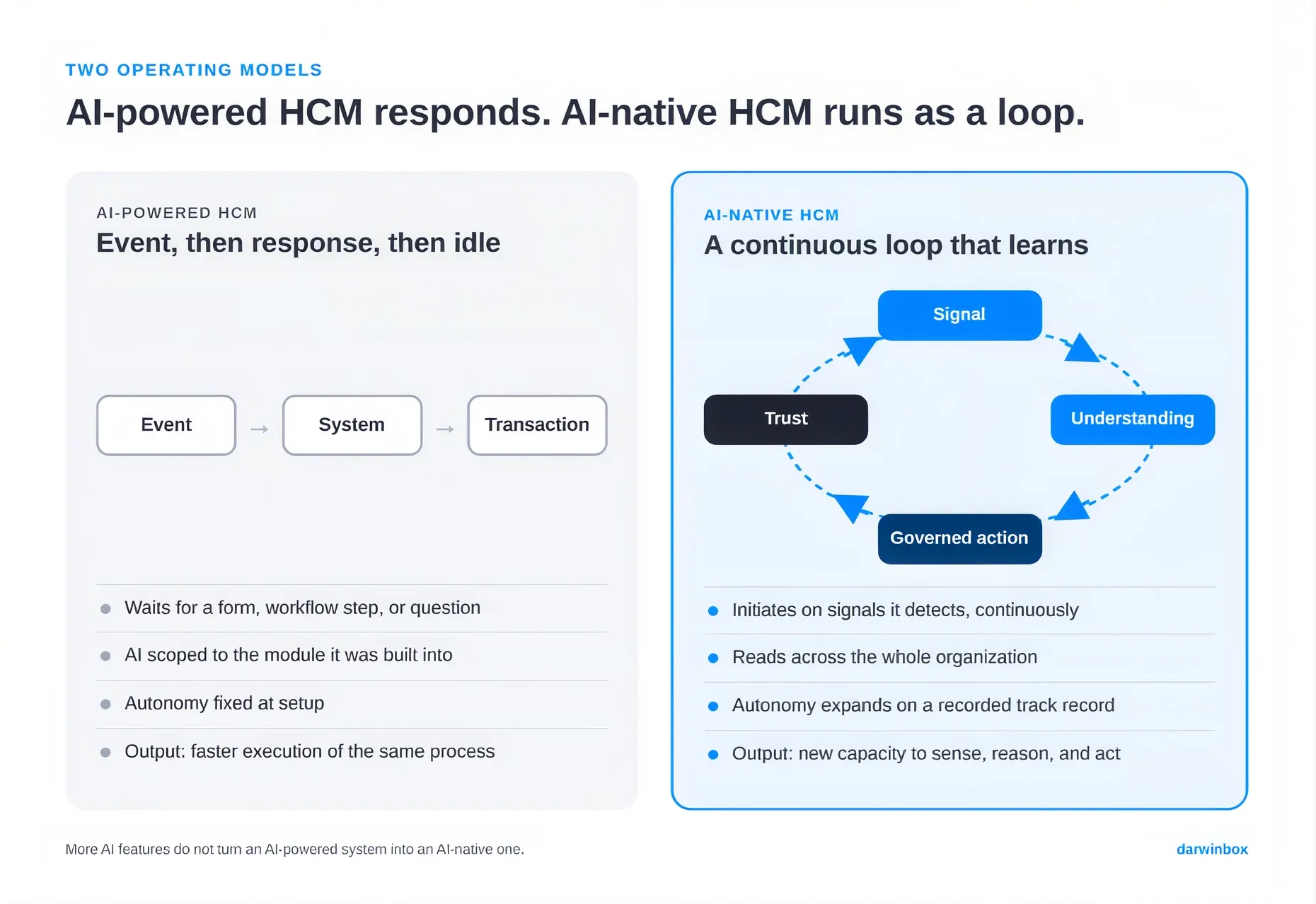
Adding more AI features to an AI-powered system won't eventually turn it into an AI-native one, because the two are built differently from the ground up. That's why the seven questions below look at how a system is built and controlled, not at its feature list.
7 Questions to Assess Whether an HCM is Truly AI-Native
| Question | What a strong answer looks like | Red flag |
|---|---|---|
A specific insight drawn from two or more modules, shown live | "Our analytics tool can combine reports" | |
Data designed to be read as one organization from the start | AI features listed module by module | |
Judgment grounded in your own history, improving with feedback | Industry benchmarks applied to every customer | |
The system reasons through a situation and recommends or takes an appropriate action, even when the scenario wasn't predefined, within permissioned boundaries | The system can only execute predefined actions, or can only recommend what someone should do when it hits something outside those workflows | |
Autonomy that grows on a recorded track record | Permissions fixed at implementation | |
A detailed record of what the system did, why, what informed the action, and what happened next, with the ability to reverse it where appropriate | A basic activity log that tells you what happened, but not why | |
Output delivered inside everyday work tools (e.g., Teams, Slack) | Value available only after login |
Understanding Each Question in More Detail
1. Can your AI reason across more than one module in a single output, without anyone pulling the data together by hand first?
Most HCM platforms were assembled one module at a time, and each module kept its own data to answer its own narrow set of questions. Put an AI feature in the performance module and it sees performance data. Put one in recruiting and it sees recruiting data. Neither will catch a pattern that only becomes visible when you read both together.
Why it matters: The patterns worth acting on usually span modules. An AI that sees only one module will miss them.
How to probe it: Ask for a real example. A roadmap slide doesn't count. A good answer points to a specific pattern the system actually observed. For example, hires from one university consistently earning stronger first-year performance ratings and staying longer than hires from another. Be wary if the answer is about an integration layer, or a dashboard that pulls reports together and leaves a person to work out what they mean.
2. Was your data model designed from the start to be read as one connected organization, or was AI added later to a platform organized around separate modules?
Why it matters: The data model sets the limit on what the AI can see. Connecting modules after the fact rarely gives you the same visibility.
How to probe it: Ask how the AI's capabilities are documented. If they're listed module by module, the architecture probably is too.
3. How does the system tell a pattern that's normal for your organization apart from one that signals real risk?
A signal on its own isn't a judgment. Picture a spike in resignations in a sales team. At one company, that spike may have repeated every year for five years, tied to when commissions pay out. Expected, and nothing to worry about. At another company with no such history, the same spike could be the first sign of a group exit driven by one manager. A system reasoning from generic benchmarks has no way to tell the two apart.
Why it matters: Without your context, the system either raises too many false alarms or misses the real ones.
How to probe it: Ask whether that judgment comes from your own historical data or from a benchmark applied to every customer. Then ask what the system does in the months right after go-live, before it has much of your history to work with, and how your team's corrections shape what it surfaces later.
4. Can the system reason and act when it encounters a scenario that wasn't predefined, or is it limited to workflows and actions designed in advance?
An insight loses most of its value if it sits waiting for someone to notice it and act on it manually. The situations that matter most rarely fit a workflow someone designed in advance.
Why it matters: A system that can only run predefined workflows will stall on exactly the cases where you need it most.
How to probe it: Bring a scenario the vendor hasn't prepared for and ask what the system would do with it, and what stops it from going too far.
5. What sets the boundary of what the system is allowed to do, and can that boundary expand over time? On what basis?
No CHRO should hand broad authority to a system with no track record. At the same time, a system that never gains more authority will never do much more than it did on day one. The way through that tension is a specific design choice: start with narrow permissions, log everything, and expand autonomy only when the evidence supports it. That's why agent controls need to be part of the design from day one, instead of something added afterward.
Why it matters: Of the seven, this is one of the clearest ways to tell vendors apart in a live evaluation. The important thing is not simply whether permissions exist, but how they are defined, how they change, and what determines the system's boundaries over time.
How to probe it: Ask who approves an expansion of autonomy, and what evidence they use to decide.
6. Is every action the system takes scoped, logged, and reversible by default? Can you show an audit trail for an action the system took on its own?
Why it matters: This question tests whether governance holds up in practice. A system that can show exactly what it did, why it did it, and whether the action can be reversed gives you a strong foundation for governance.
How to probe it: Ask them to show you the audit trail on screen, not describe it.
7. Does the system deliver its output inside the tools people already use every day, or does someone have to log in to get value from it?
Very few employees want to log in to an HR system to get their work done. Their day runs through email, collaboration tools, and meetings.
Why it matters: A system people have to go looking for behind a login screen ends up underused, however capable it is.
How to probe it: Ask to see a signal delivered in Teams or Slack, and whether the person can act on it there without switching to another screen.
How to get reliable answers in a live evaluation
Three habits will get you more reliable answers from vendors.
1. Bring your own scenario. Before the demo, pick a real case your team missed or caught late, such as an attrition pattern from last year. Anonymize it and send it to each vendor in advance. In the demo, ask them to walk through exactly how their system would have flagged it, when, and to whom.
2. Ask to see the audit log, not hear about it. When a vendor says its AI decisions are traceable, ask them to open the log on screen. Pick one recommendation the system made and trace it back: what data it used, which model version produced it, and who acted on it. If they can't show this live, assume it doesn't exist in the form you need.
3. Put an HR business partner in the room. Invite the HRBP who would actually use the system day to day, not just the buying committee. Hand them the keyboard for ten minutes and have them ask: "Show me how I would build this myself, without calling IT or your team." Then give them a small task to try on their own. For example: "Find the teams where people haven't had a manager check-in in 60 days, and set up a reminder that goes to those managers." Whether they can do it alone tells you if the tool makes HRBPs builders or keeps them as users.
In an AI-native environment, one of the most useful skills an HRBP can have is the ability to argue with the system. That means pushing back when a signal doesn't match what they know, asking why it was raised, and correcting it when it's wrong. Ask the vendor to show what happens when an HRBP rejects a signal, and whether that correction changes what the system surfaces next time.
How does Darwinbox Cortex answer these questions?
Darwinbox Cortex is the first AI-native HCM built from the ground up on a context graph. The context graph connects information across the organization instead of keeping it locked inside separate modules. Cortex works through four capabilities:
Senses. Built on the context graph, Cortex keeps drawing signal from across the whole organization rather than one module at a time, so early signs of risk or opportunity show up without anyone having to search for them.
Reasons. Each signal is read against the organization's own policies, history, and people, so what Cortex surfaces reflects that specific company instead of a generic average.
Acts. Cortex takes defined actions inside boundaries the organization has explicitly set. Every action is scoped, logged, and reversible by design.
Meets. Cortex delivers what it senses, reasons, and does inside the tools people already use for their daily work.
These capabilities run as a loop rather than a one-time sequence. Whatever happens after Cortex acts, including whether someone accepted or corrected its proposal, feeds back as learning. Cortex begins with narrow authority and earns broader autonomy through a track record the organization can inspect, and it understands the organization better with each cycle.
"Legacy HCM with AI bolted on is still legacy," said Jayant Paleti, co-founder and co-CEO of Darwinbox.
The label is easy. The evidence is not.
Ask any vendor on your shortlist whether its platform is AI-native and you'll hear yes. Far fewer can show you, using your own scenarios, a system that sees across modules, reasons in your context, acts within limits you control, and builds its own record of trust. Set up your evaluation to find that evidence.
See how an AI-native HCM handles these seven questions in practice: Explore Darwinbox Cortex.